![Logo_quer_farbig.png]](https://docs.sentinum.de/hs-fs/hubfs/Logo_quer_farbig.png?height=40&name=Logo_quer_farbig.png)
📄 You can view the PDF above or
download it here
.
Table of Contents
- Getting Started
- NFC Configuration and Location of the NFC Tag
- LoRaWAN® Payload Decoder Febris Series
1. Getting Started
Caution
Please note that using knives or other sharp objects may damage the housing or the electronics .
-
Open the sensor at the tab provided for this purpose
(marked on the bottom edge in the illustration). If
necessary, carefully use a sharp object.
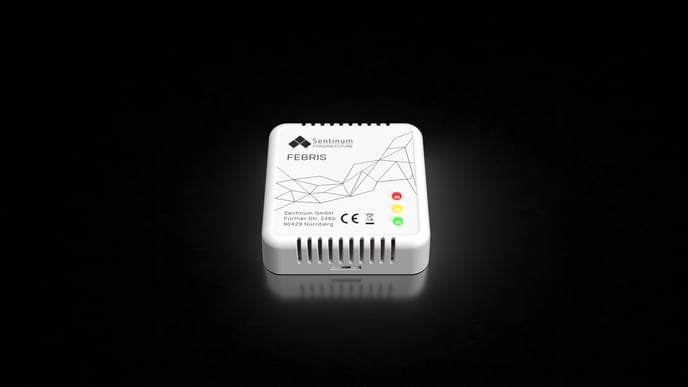
Figure 1. Opening the sensor housing -
Now insert the battery cells. To achieve the specified
run times and performance,
only the following primary cells may be used
:
-
For LoRaWAN® and mioty® sensors:
- Energizer® Ultimate Lithium AA
- VARTA ULTRA LITHIUM Mignon AA
-
For cellular sensors (NB-IoT):
- Energizer® Ultimate Lithium AA
- VARTA ULTRA LITHIUM Mignon AA
-
For LoRaWAN® and mioty® sensors:
.png?width=306&height=343&name=Untitled%20(16).png)
Four cells are required per sensor.
.png?width=688&height=451&name=Untitled%20(17).png)
.png?width=688&height=298&name=Untitled%20(18).png)
.png?width=688&height=414&name=Untitled%20(20).png)
.png?width=688&height=290&name=Untitled%20(21).png)
2. NFC Configuration and Location of the NFC Tag
-
Configuration is performed using an NFC app. This requires a
smartphone. The app can be downloaded from the respective app stores
Search for "Sentinum LinQs" and
install the LinQs app.
.png?width=688&height=331&name=Untitled%20(22).png)
Figure 7. Downloading the Sentinum LinQs app -
First, locate the NFC tag on the sensor, and then
the NFC reader on your smartphone. The position of the NFC tag is
shown in the following figure.
.png?width=306&height=303&name=Untitled%20(23).png)
Figure 8. Position of the NFC tag on the sensor
3. LoRaWAN® Payload Decoder Febris Series
Note
The following decoder can be used to decode the payloads of the Febris series in LoRaWAN® network servers such as The Things Stack .
function decodeUplink(input) {

    var decoded = {};
    var bytes = input.bytes;

    if (input.fPort == 1) {//TELEMETRY

        //decode header
        decoded.base_id = bytes[0] >> 4;
        decoded.major_version = bytes[0] & 0x0F;
        decoded.minor_version = bytes[1] >> 4;
        decoded.product_version = bytes[1] & 0x0F;
        decoded.up_cnt = bytes[2];
        decoded.battery_voltage = ((bytes[3] << 8) | bytes[4]) / 1000.0;
        decoded.internal_temperature = ((bytes[5] << 8) | bytes[6]) / 10 - 100;
        decoded.networkBaseType = 'lorawan';
        decoded.networkSubType = 'tti';

        var it = 7;

        if(decoded.minor_version >= 3){
            it = 7;

            //Luftfeuchte ist bei allen Varianten enthalten
            decoded.humidity = bytes[it++];

            if (decoded.product_version & 0x01) { // Co2 und Druck sind enthalten wenn subversion bit0 = 1, andernfalls 0
                decoded.pressure = (bytes[it++] << 8 | bytes[it++]);
                decoded.co2_ppm = (bytes[it++] << 8 | bytes[it++]);
            } else {
                it += 4;//Werte sind 0  aus kompatibilitäts Gründen, daher überspringen
            }

            decoded.alarm = bytes[it++];//Alarm-Level, entspricht grün, gelb, rot

            //FIFO Werte wegwerfen (1 byte fifo size, 1 byte period, 7 bytes pro fifo eintrag)
            it += 2 + bytes[it] * 7;

            decoded.dew_point = ((bytes[it++] << 8) | bytes[it++]) / 10 - 100;

            // Wandtemperatur und Feuchte enthalten wenn subversion bit 2 = 1
            if (decoded.product_version & 0x04) {
                decoded.wall_temperature = ((bytes[it++] << 8) | bytes[it++]) / 10 - 100;
                decoded.therm_temperature = ((bytes[it++] << 8) | bytes[it++]) / 10 - 100;
                decoded.wall_humidity = bytes[it++];
            }

        }else{
            it = 7;

            //Luftfeuchte ist bei allen Varianten enthalten
            decoded.humidity = bytes[it++];

            if (decoded.product_version & 0x01) { // Co2 und Druck sind enthalten wenn subversion bit0 = 1, andernfalls 0
                decoded.pressure = (bytes[it++] << 8 | bytes[it++]);
                decoded.co2_ppm = (bytes[it++] << 8 | bytes[it++]);
            } else {
                it += 4;//Werte sind 0  aus kompatibilitäts Gründen, daher überspringen
            }

            decoded.alarm = bytes[it++];//Alarm-Level, entspricht grün, gelb, rot

            //FIFO Werte wegwerfen (1 byte fifo size, 1 byte period, 7 bytes pro fifo eintrag)
            it += 2 + bytes[it] * 7;

            //Taupunkt seit minor version 2 bei alle Varianten enthalten (ausnahme früher versionen subversion 2, daher byte prüfen)
            if (decoded.minor_version >= 2 && bytes[it] ) {

                decoded.dew_point = bytes[it++] - 100;
            }

            // Wandtemperatur und Feuchte enthalten wenn subversion bit 2 = 1
            if (decoded.product_version & 0x04) {
                decoded.wall_temperature = bytes[it++] - 100;
                decoded.therm_temperature = bytes[it++] - 100;
                decoded.wall_humidity = bytes[it++];

            }


        }
    }

    return {
        data: decoded,
        warnings: [],
        errors: []
    };

}